
Question Classifier Node
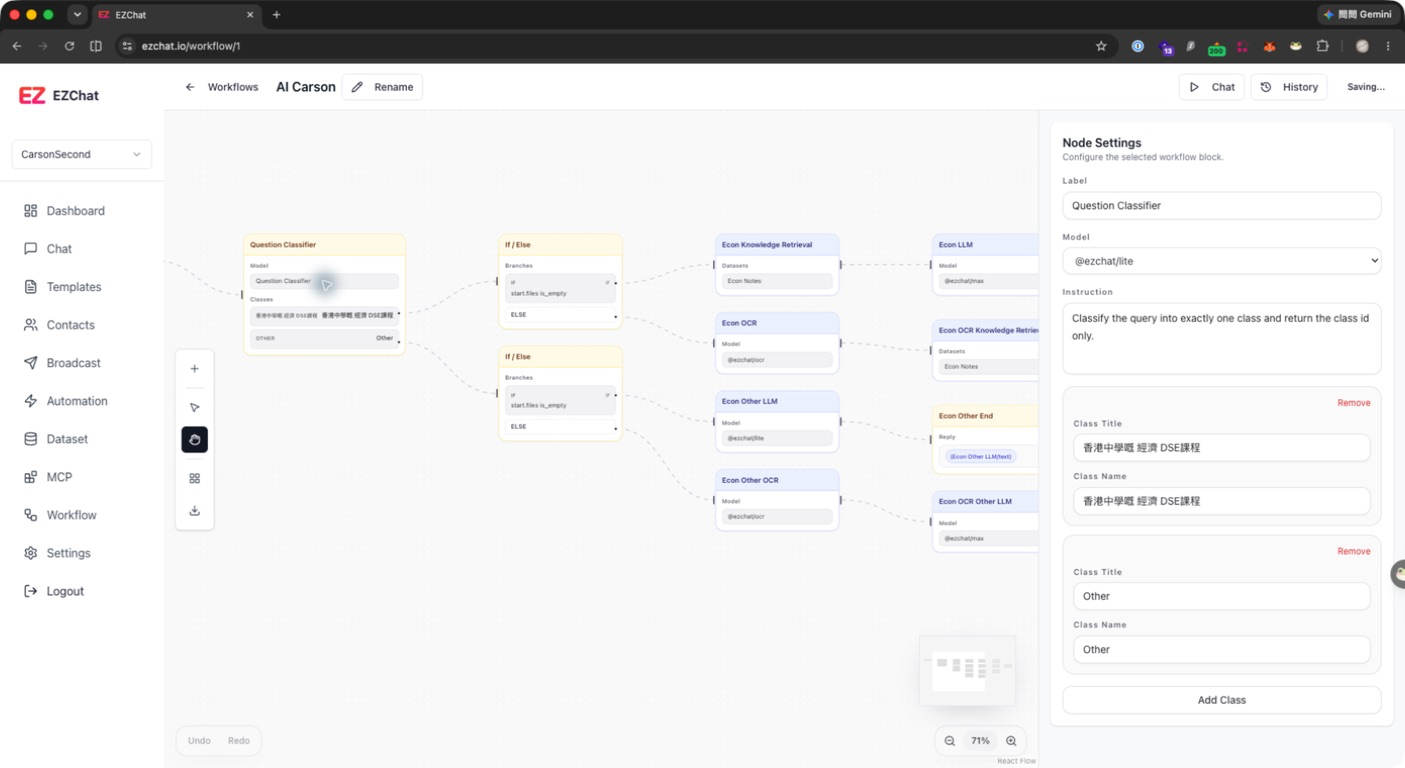
The Question Classifier node classifies user questions into predefined classes, allowing downstream workflow branches to handle each class differently. It is suitable for FAQ routing, sales or support routing, and selecting different datasets by intent.
Quick Understanding
The Question Classifier Node classifies the input. It asks AI, in effect: “I have several types here. Which type does this input belong to?” The classification result is usually passed to If / Else for routing.
Configurable Fields
| Field | Description |
|---|---|
| Label | Node name. |
| Model | Model profile used for classification. |
| Instruction | Classification instruction. |
| Class Title | Display title shown in settings. |
| Class Name | The class name returned or used for branch checks. |
Default classes include Sales and Support. You can remove, update, or add classes.
Output
The Question Classifier node provides:
| Field | Description |
|---|---|
class_id | Class ID. |
class_name | Class name. |
keywords | Related keywords. |
usage | Model usage data. |
model | Model used by the node. |
A common pattern is to connect If / Else after Question Classifier and route based on class_id or class_name.
Setup Steps
- Add a Question Classifier node.
- Select a Model.
- Write clear classification rules in Instruction.
- Configure each class title and name.
- Check classification results in a downstream If / Else node.
Recommendations
- Use stable class names, such as
sales,support, orbilling. - Instruct the model to return only one of the configured classes.
- Too many classes increase misclassification risk. Start with broad classes, then refine downstream if needed.