
Knowledge Retrieval Node
The Knowledge Retrieval node searches datasets for chunks related to a query and provides the results to downstream nodes. It is often connected after Start, Question Classifier, or If / Else, then passes documents to an LLM.
Quick Understanding
The Knowledge Retrieval Node uses the input to search the Dataset you specify, finds relevant information, and passes the results to downstream LLM or End nodes.
Configurable Fields
| Field | Description |
|---|---|
| Label | Node name. |
| Query | Variable used for retrieval. It must be selected from the list. |
| Knowledge Base | Datasets to retrieve from. You can add multiple datasets. |
Query uses the user input sys.query by default. If an upstream node produces a better search query, you can select that output instead.
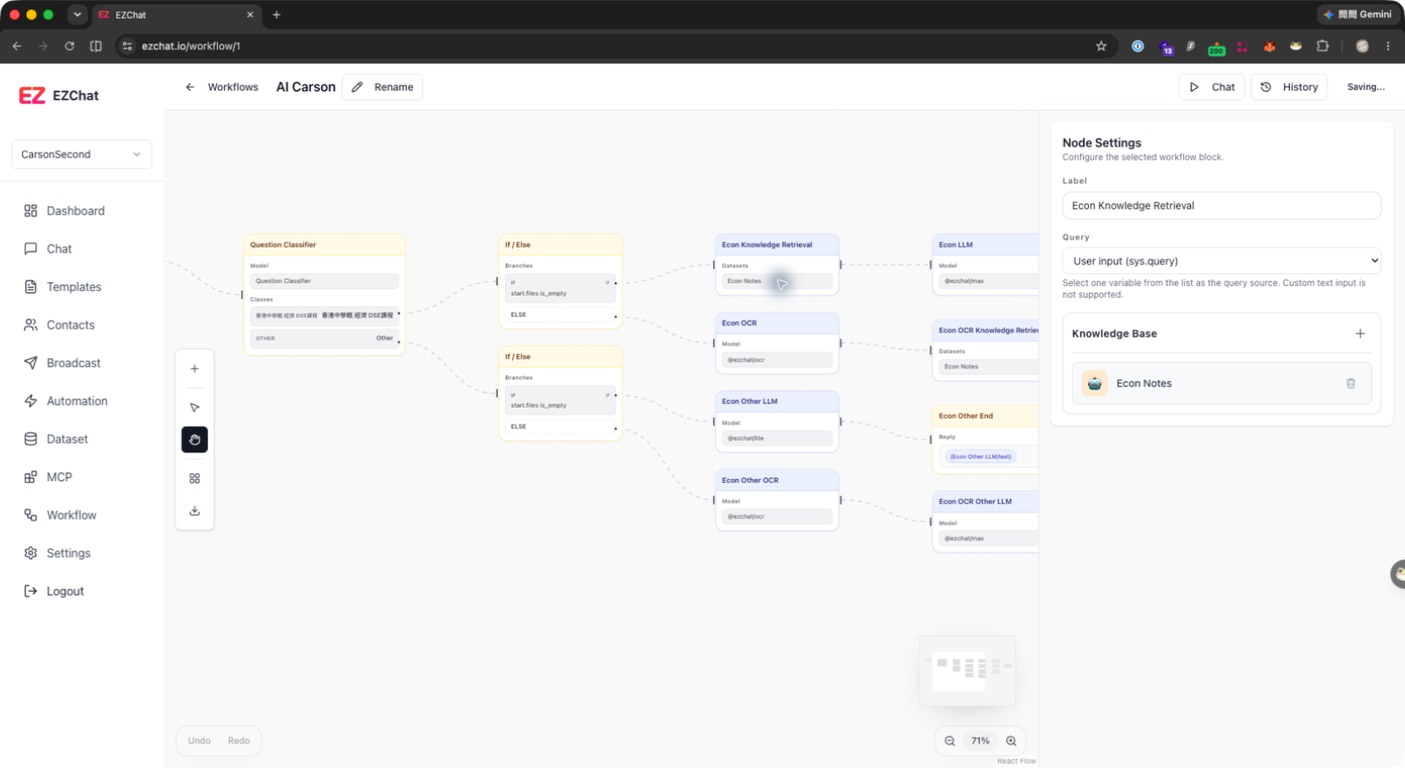
Add a Dataset
- Add a Knowledge Retrieval node.
- Select the query source in Query.
- Click
+in the Knowledge Base area. - Select a dataset from the list.
- Repeat the step if multiple knowledge sources are needed.
If no dataset appears in the list, create a dataset and process documents first.
Output
The Knowledge Retrieval node provides:
| Field | Description |
|---|---|
documents | Retrieved document chunks. |
Downstream LLM or End nodes can reference these documents. If a chat response uses knowledge retrieval results, Studio also attempts to show citations below the assistant message.
Recommendations
- Dataset documents should be completed; otherwise, retrieval may be insufficient.
- Query should be a clear question or a search sentence rewritten by an LLM.
- If there are too many datasets, use If / Else or Question Classifier first to route to a more precise dataset.