
If / Else Node
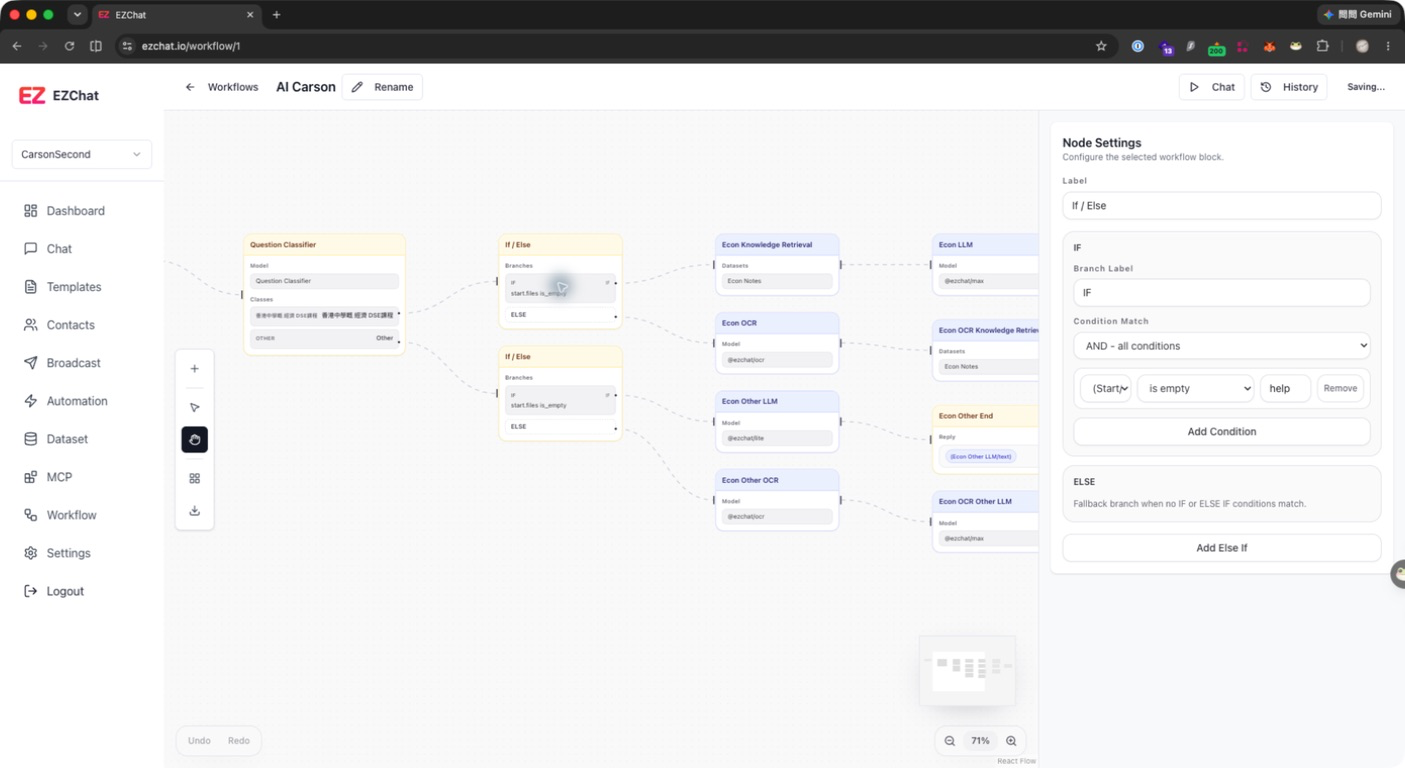
The If / Else node routes workflow execution based on conditions. You can select an upstream output as the left value, then set an operator and comparison value so different inputs follow different branches.
Quick Understanding
The If / Else Node checks conditions against the input or upstream result, then decides which branch the workflow should follow.
Configurable Fields
| Field | Description |
|---|---|
| Label | Node name. |
| Branch Label | Branch name, such as IF or ELSE IF 1. |
| Condition Match | Uses AND or OR between multiple conditions. |
| Left value | Selects a variable from upstream node outputs. |
| Operator | Comparison method. |
| Compare value | Value to compare against. |
Supported operators include:
- contains
- does not contain
- starts with
- ends with
- equals
- does not equal
- is empty
- is not empty
Setup Steps
- Add an If / Else node.
- Connect the upstream node that provides the value to check.
- Enter a clear Label.
- In the IF branch, select the left value, operator, and comparison value.
- If there are multiple conditions, select AND or OR.
- Click Add Else If to add another branch.
- Keep the ELSE fallback for cases where no condition matches.
Common Uses
- Route based on whether the user question contains keywords.
- Route according to a Question Classifier
class_idorclass_name. - Handle HTTP node success or failure based on
status_code. - Decide whether to fallback based on whether Knowledge Retrieval has results.
Notes
If / Else can only select variables from connected upstream nodes. If the left value menu is empty, check the edge direction and confirm that the upstream node is connected correctly.